
September 28, 2026
Your Booth, Your Colors: Full Color Palettes Are Here
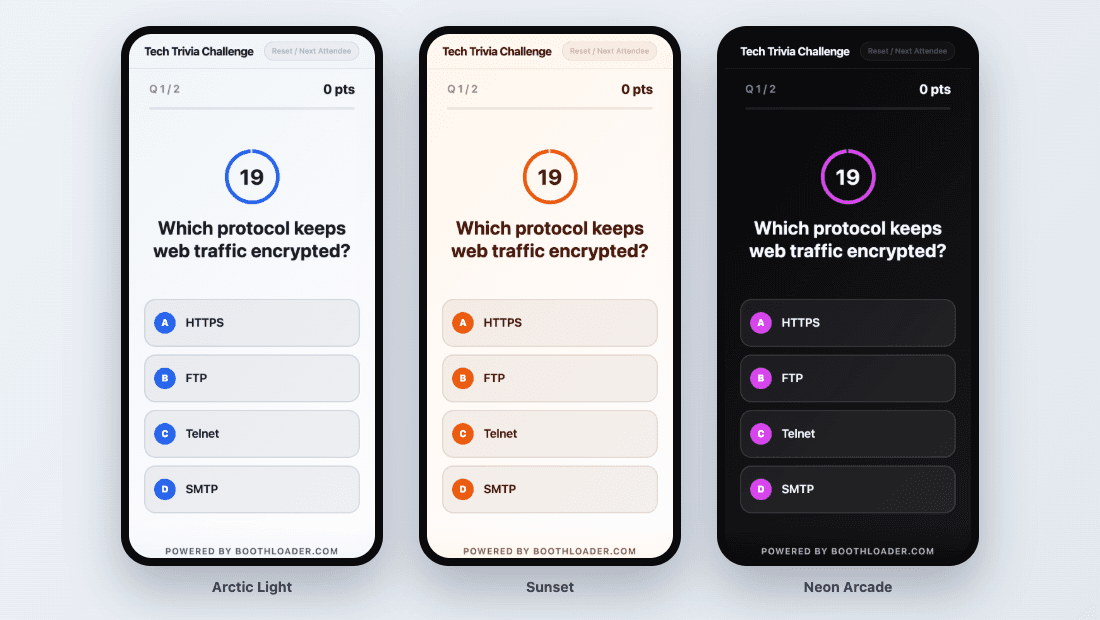
Your booth is a brand experience. The banner, the swag, the team shirts all match. Until now, the screen at the center of it all only took your logo and a single accent color, on a dark background whether you liked it or not. If your brand is white and airy, or bold and neon, your games did not look like you.
That changes today.
Five colors, every attendee screen
Every activity now has a full color palette:
- Primary for buttons, highlights, and scores
- Secondary for a second accent
- Background for the page itself
- Surface for cards, panels, and form fields
- Text for headings and body copy
Your palette applies everywhere attendees look: trivia, spin-to-win, code challenges, true-or-false cards, the estimation slider, the live leaderboard on your booth TV, and the lead capture and survey forms on their phones. One palette, one consistent experience from the first scan to the final score.
Light or dark, your call
Pick from eight built-in presets to get started in seconds, from the classic dark Midnight to the bright Arctic Light and the warm Sunset. Or enter your own brand colors as hex codes and make it exactly yours.
Light palettes are fully supported. Answer buttons, timers, correct and wrong feedback, leaderboard medals, and even the spinning wheel adapt automatically, so everything stays readable no matter what background you choose.
See it before your attendees do
The Branding page now shows a live preview as you edit: a game question, a leaderboard row, and the lead form, all rendered with your colors. If a combination would be hard to read, like pale text on a white background, you get a clear warning with the contrast ratio, so you can fix it before it reaches your booth.
Save it once, use it everywhere
Running several activities, or the same brand at every event? Click Save to my palettes and your palette is available on every activity in your organization. Set up your next booth in one click instead of retyping hex codes.
Nothing changes unless you want it to
Existing activities keep exactly the look they have today. When you are ready, open an activity, go to Branding, and choose your palette.
Get started
Your booth should look like your brand, not like ours. Get in touch and make your first branded activity.